How to split a bill when not everyone has the app
By Mitch R, Tab Tender Team · 3 min read · Updated June 2, 2026
Use a tool that works from a shared link in any browser. With Tab Tender you can start a tab without signing up, share one link, and each person sees their exact share and a tap-to-pay button — no app install and no account required to pay you.
The fastest way to kill a group split is to tell everyone to "download this app and make an account first." Half the table won't, and you're back to mental math. The better approach skips the install entirely: split from a link that opens in any browser.
On this page
Why app-required tools stall
Most bill-splitting apps ask every participant to install the app and create an account before they can see what they owe or pay. For a one-time dinner with a mixed group, that's a non-starter — people won't sign up for a $22 share.
Split from a shareable link instead
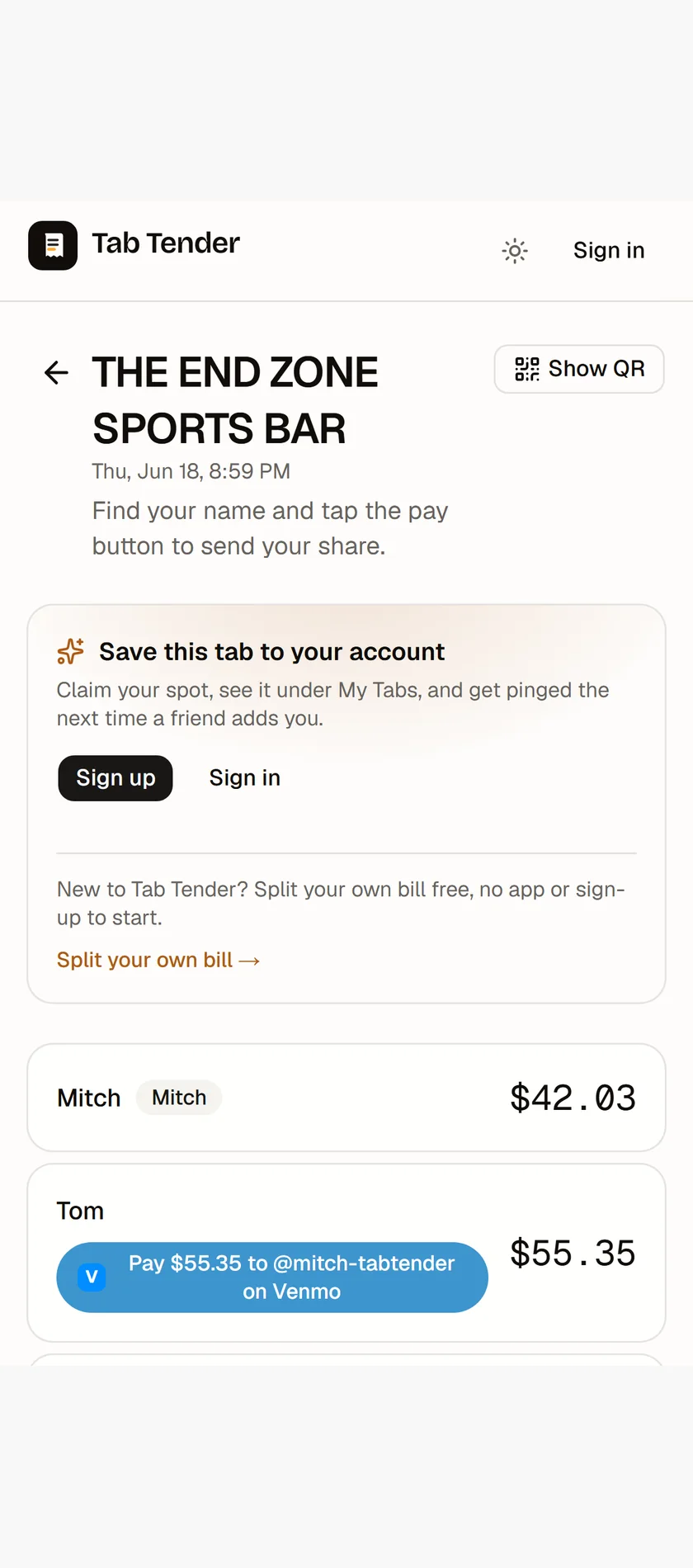
Tab Tender runs in the browser. You can start a tab as a guest — no signup — snap or enter the items, assign who had what, and share one link. Anyone who opens it sees the bill, finds their name, and gets their exact total. No app, no account, no install prompt.
How people pay you without signing up
Each person's share comes with a pay button that opens Venmo or Cash App pre-filled with the right amount, or a tap-to-copy identifier for Zelle. They pay from an app they already have on their phone — so nobody needs an account with us to send you money.
When an account is still worth it (and what it unlocks)
To be clear: the people paying you never need an account — that's the whole point of sharing a link. But signing up is free, takes a few seconds, and quietly does a lot on both sides of a tab.
If you're the organizer, an account saves your payment handles, remembers every tab you've made, tracks who's paid you back, sends one-tap reminders to stragglers, and lets you add friends and saved groups so you can load your regular crew in a tap.
And if you're just a guest on someone else's tab, it's worth a free account there too:
- Claim your spot so the tab is saved to your account — you can find it again instead of digging through texts for the link.
- See a running balance with that friend across every tab you share, so small amounts net out instead of pinging money back and forth all month.
- Flag an item that wasn't yours, or help fill in who had an unassigned dish — so your share is right before you pay.
- Get dropped onto future tabs in a tap — friends can add you already claimed and notified, no link-hunting.
- Save your own Venmo, Cash App, or Zelle handle now, so the day you host, your pay links are ready to go.
What if someone doesn't have Venmo, Cash App, or Zelle?
Offer more than one rail and most gaps close — between Venmo, Cash App, and bank-to-bank Zelle, almost everyone already has at least one on their phone, and none of them require an account with us. For the rare holdout, fall back to the oldest method there is: tell them their exact amount and take cash, then mark their share paid so the running total still balances. The point isn't to force one app on the table; it's to make the amount unambiguous and let each person settle however is easiest for them.
Bottom line
None of it is required — anyone can open a link and pay you with nothing at all. But a free account turns Tab Tender from a one-off calculator into something that remembers your tabs, nets out what friends owe you, and makes the next split even faster, whether you're hosting or just along for dinner.